
BitBrowser: the anti-detect browser you should certainly try
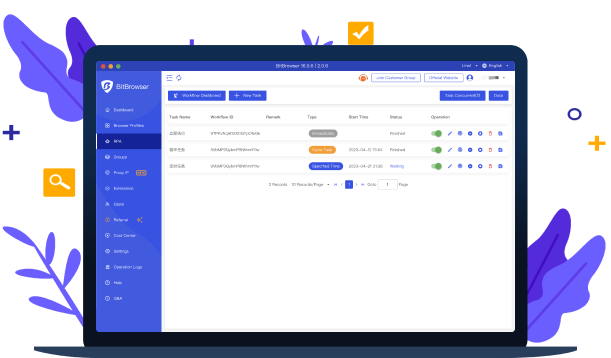
At Quick Proxy we often stress the importance of private, low-detection browsing. High-quality residential proxies are the foundation, but they are only half of the setup. Websites also identify you through your browser fingerprint, and that is where an anti-detect browser comes in. In this review we look at BitBrowser: what it is, its main features, how to connect it to residential proxies, and who it suits best.
Need proxies for your BitBrowser profiles? Get a trial on QuickProxy for only $1.99.
Why you need an anti-detect browser
Changing your IP address with a proxy hides your location, but websites can still link your sessions through dozens of other signals. These include screen resolution, fonts, time zone, language, WebGL and canvas data, and installed plugins. If several accounts share the same fingerprint, platforms can connect them even when each uses a different IP.
An anti-detect browser creates separate browser profiles, each with its own consistent fingerprint, cookies, and storage. Combined with a dedicated residential proxy per profile, each profile looks like a separate, ordinary user. This is far more complete than browser extensions, which can only change a few parameters.
What is BitBrowser?
BitBrowser is an anti-detect browser built for managing multiple accounts and teams. Each browser window runs in an isolated environment with its own fingerprint, so there is no correlation between profiles. This reduces the risk of linked accounts and bans for teams that legitimately manage many profiles, such as agencies, e-commerce sellers, and social media managers.
Key features of BitBrowser
Isolated profiles (anti-association)
Every profile has a separate fingerprint, cookies, cache, and local storage, with no shared data between profiles. This is the core value of any anti-detect browser, and BitBrowser handles it well.
Multi-account management
BitBrowser is designed for running many accounts side by side, for example:
- social media accounts for different clients or brands;
- marketplace and e-commerce seller accounts;
- advertising accounts across platforms;
- website and platform accounts for testing and QA.
Automatic environment matching
BitBrowser can match each profile’s time zone, language, and geolocation to the IP address of the proxy assigned to it. This consistency matters: a profile with a German IP but a US time zone looks suspicious. Matching them automatically avoids that mismatch.
Team collaboration
- user groups and role-based permissions;
- flexible allocation of profiles to team members;
- batch import, export, and sharing of profiles;
- cloud synchronisation, so every team member works with up-to-date profiles.
Advanced features
Window synchroniser
Group control lets you repeat actions, such as mouse clicks, keyboard input, and tab operations, across multiple browser windows at once. This saves time on repetitive tasks across many profiles.
Automation (RPA and API)
BitBrowser supports robotic process automation (RPA) to build workflows without code, and a local API for developers who prefer Selenium, Puppeteer, or Playwright. See the official RPA guide for details.
Script marketplace
A built-in marketplace where developers publish automation scripts and users can request custom ones.
How to use Quick Proxy residential proxies with BitBrowser
- Create a profile. In BitBrowser, click to add a new browser profile and give it a clear name, such as the client or account it belongs to.
- Choose the proxy type. In the proxy section, select HTTP or SOCKS5. Quick Proxy supports both.
- Enter the proxy details. Paste the host and port, then the username and password from your Quick Proxy dashboard. To choose a country, add the country code to your username, for example
username-cc-us. - Check the proxy. Use BitBrowser’s built-in proxy check to confirm that the connection works and the location is correct.
- Let BitBrowser match the environment. Keep time zone, language, and geolocation set to follow the IP.
- Launch the profile and confirm the IP on an IP-check website before you log in to any account.
Tip: for account management, use sticky sessions so each profile keeps the same IP. Frequent IP changes on a logged-in account can trigger security checks. Learn more about rotating vs sticky sessions.
Who should use BitBrowser?
- Agencies and social media managers running accounts for many clients.
- E-commerce sellers managing stores on several marketplaces.
- Affiliate marketers and media buyers working with several ad accounts.
- QA and research teams that need clean, separate browser environments.
Always follow the terms of the platforms you use. An anti-detect browser keeps legitimate accounts separate, but it does not make it acceptable to evade bans or create fake accounts.
BitBrowser alternatives
If BitBrowser does not fit your workflow, compare it with other anti-detect browsers we cover: AdsPower, Kameleo, Dolphin Anty, Multilogin, and Hidemyacc.
Pricing
BitBrowser offers a free tier with a limited number of profiles, so you can test it before you pay, as well as paid plans for larger teams. Plans change over time, so check the current options on the official pricing page.
Conclusion
BitBrowser is a capable anti-detect browser with strong profile isolation, automatic environment matching, team features, and automation tools. Paired with Quick Proxy residential proxies, one proxy per profile, it gives each account a consistent, realistic identity. It is well worth trying, especially through its free tier.
Power your BitBrowser profiles with residential IPs: get 1 GB of bandwidth for $6.
Questions and Answers
Q1: Do I need proxies with BitBrowser?
A1: Yes. BitBrowser separates browser fingerprints, but all profiles would still share your real IP address without proxies. Assign one residential proxy to each profile.
Q2: Which proxy protocol should I use in BitBrowser?
A2: Both HTTP and SOCKS5 work with Quick Proxy. SOCKS5 is a good default for most use cases.
Q3: Should I use rotating or sticky proxies for account management?
A3: Use sticky sessions so each account keeps a stable IP. Use rotating proxies for scraping and research tasks where you don’t log in.
Related reading
Put the article into practice.
Spin up real residential IPs in 150+ countries. Pay once or subscribe — from $11.